
Preview: https://www.youtube.com/watch?v=wZEwriOlMLs
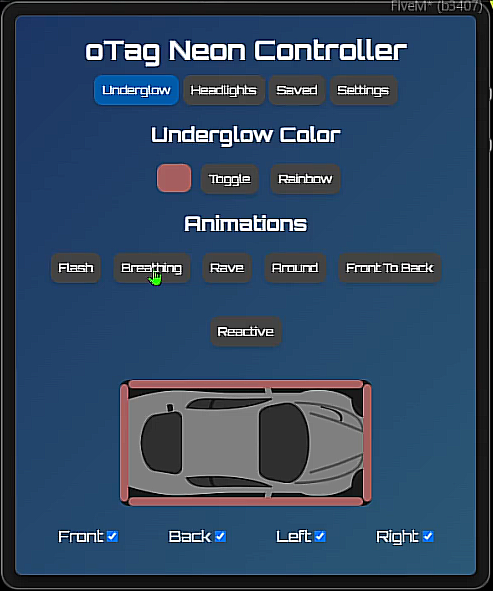
Light up the streets with oTag Neons, the most feature-rich and visually stunning vehicle neon and headlight controller for your FiveM server. This script moves beyond simple on/off commands, providing players with a beautiful, interactive tablet UI to fully customize their ride's lighting with unique animations, colors, and presets.
Designed for deep immersion and endless customization, oTag Neons includes an optional, interactive installation system that can be locked to mechanic jobs, creating new RP scenarios and a rewarding experience for players who want to earn their upgrades.
✨ Core Features
Interactive Tablet UI: A beautiful, modern, and draggable tablet interface for controlling everything.
Live Vehicle Preview: A visual overhead view of your vehicle within the UI that shows changes in real-time.
Individual Neon Control: Toggle Front, Back, Left, and Right neons independently.
Underglow & Headlight Colors: Full RGB color control for both your underglow neons and your xenon headlights.
Saved Configurations: Players can save, name, apply, and delete an unlimited number of their favorite lighting setups.
Data Persistence: Saves which vehicles have neons installed and all personal player presets, which are automatically re-loaded.
💥 Animations & Effects
Give your vehicle a unique personality with a huge selection of animations:
Underglow Animations: Includes Rainbow, Flash, Breathing, Rave, Around, Front-to-Back, and a special RPM-based Reactive mode!
Headlight Animations: Includes Rainbow and Flash modes for headlights.
🔧 Immersion & Configuration
Mechanic-Locked Installation: Configure the script to require an interactive installation process that can be limited to specific mechanic jobs. Players must visit each corner of the vehicle to install the kits.
Item or Command-Based: Open the menu or install kits using configurable server commands or inventory items.
10+ UI Themes: Players can choose from over 10 incredible UI themes in the settings tab, including Matrix, Synthwave, Carbon Fiber, Frosted Glass, and more.
Standalone Exports: Includes
getNeonDataandsetNeonDataexports to allow integration with other scripts like garages or vehicle tuning menus.
🛠️ Installation & Dependencies
Ensure you have all dependencies installed.
Drag and drop
otag-neonsinto your resources folder.Configure
config.luato your liking (set up items, commands, and mechanic jobs).Add
ensure otag-neonsto yourserver.cfg.
Dependencies:
@oxmysqlA QBCore-based framework (for item and job checks).